
With privacy regulations placing more emphasis on user choice and consent, tracking and advertising setups have had to adapt. Google developed Consent Mode to help its tags respect the user’s consent choices while still allowing some level of measurement when consent is denied. Consent Mode itself is not a cookie banner or CMP. It works alongside one.
In this article, we are going to look at what Google Consent Mode is, how it works, its main consent types, and what to keep in mind when configuring it today.
Contents
What is Google Consent Mode?
Google Consent Mode is a feature that lets you communicate the user’s consent status to Google. Once that status is passed, Google tags adjust their behaviour accordingly so they respect the user’s choice when collecting and using data.
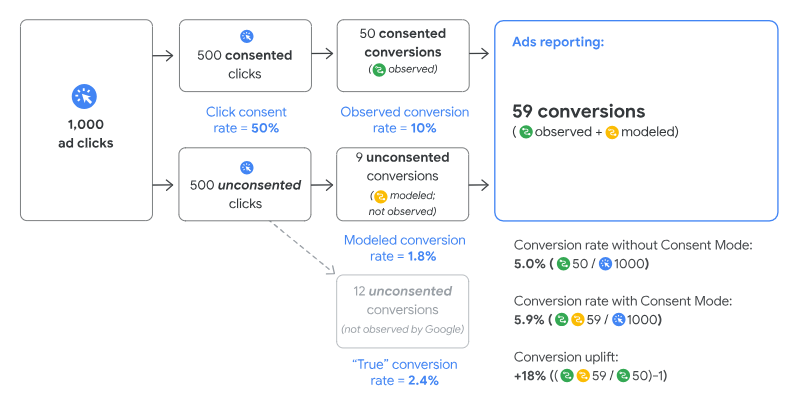
If the user does not grant consent, Google tags do not work in the same way as they do in a fully consented setup. In that situation, they can still send limited signals to Google, which can then be used for conversion and behavioural modelling in products such as Google Ads and Google Analytics 4.
How Google Consent Mode works
Consent Mode connects with the website’s cookie banner or consent management platform and receives the consent choices made by the user. Based on those choices, Google tags adapt what they store and what they send. Consent Mode does not collect consent by itself. It depends on your CMP or banner to do that part.
If the user denies consent, Google tags do not store the relevant cookies. Instead, they may send cookieless pings containing limited information about consent status and key activity. Google can then use those signals for modelling, depending on the product and setup.
Consent types
When choosing consent, the user can allow everything, deny everything, or grant only certain types of consent.
If the user grants all relevant consent, Google tags can use advertising and analytics storage normally, and Google can process advertising-related user data and ad personalisation according to the granted settings.
If the user denies everything, Google tags operate in a much more limited way. In practice, no advertising or analytics storage should be used for those denied purposes, and Google relies on cookieless pings and modelling where applicable.
Partial consent is also possible. For example, a user may deny advertising-related consent while allowing analytics consent, or the other way around. In that case, tag behaviour changes only for the consent types that were denied. This is one of the main strengths of Consent Mode, since it allows the implementation to reflect the user’s actual choices instead of treating consent as a simple all-or-nothing decision.
Configuring Google Consent Mode
The first thing to keep in mind when configuring Consent Mode is that it is not a CMP or cookie banner. It only receives and applies the consent decisions collected by that banner or platform.
Google offers different ways to implement it. One option is to configure it directly with the Google Tag using consent commands. Another is to manage it through Google Tag Manager, which includes several features specifically designed for consent handling.
In Google Tag Manager, some of the most useful features are:
- The Consent Initialization trigger, which lets consent settings be established before other tags fire.
- Built-in consent checks within Google tags.
- Tag-level consent settings.
- The Consent Overview page, which gives you a broader view of how consent is configured across the container.
It is also worth noting that many major CMPs already offer native integrations with Google Consent Mode. The exact setup depends on the CMP, so the implementation process can vary from one provider to another.
Finally, once the implementation is live, it is important to validate it properly. Google recommends using Tag Assistant to verify whether consent signals are being passed correctly and whether tags behave as expected after the user makes a choice.
In short, Google Consent Mode is designed to help Google tags respect the user’s consent choices while still supporting measurement in a more privacy-conscious way.
